The source-order match sheet
Type what you picked on the white ply and what the order page shows on the yellow ply. The tool stamps each field and writes a message you can send to iTaoBuy customer service.
Checked 16 October 2026
Fill in both plies
Fill what you have; blank fields are skipped, not counted against you. Prices are compared in yuan to the cent.
Four passes through both plies
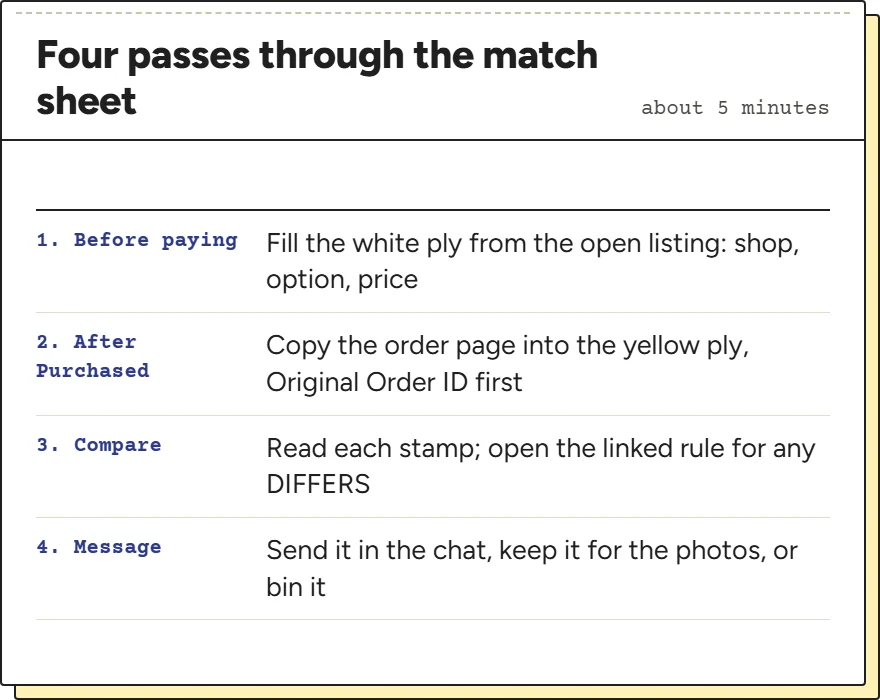
Here is how to use this tool so that each pass has something to compare. Fill the white ply before you pay, while the listing is open in front of you. That is the only moment you can copy the option text and price as the seller shows them; later the listing may be edited or gone.
Fill the yellow ply once the order status reads Purchased and an Original Order ID appears on the order details page. Copy what you see, in the language you see it. If the specification is in Chinese, paste it as it is: the tool compares characters as well as words.
Press Compare and read the stamps from the top. Then decide what to do with the message: send it through the chat, keep it as a note for when the warehouse photos arrive, or delete it because everything matched.
How each field is compared
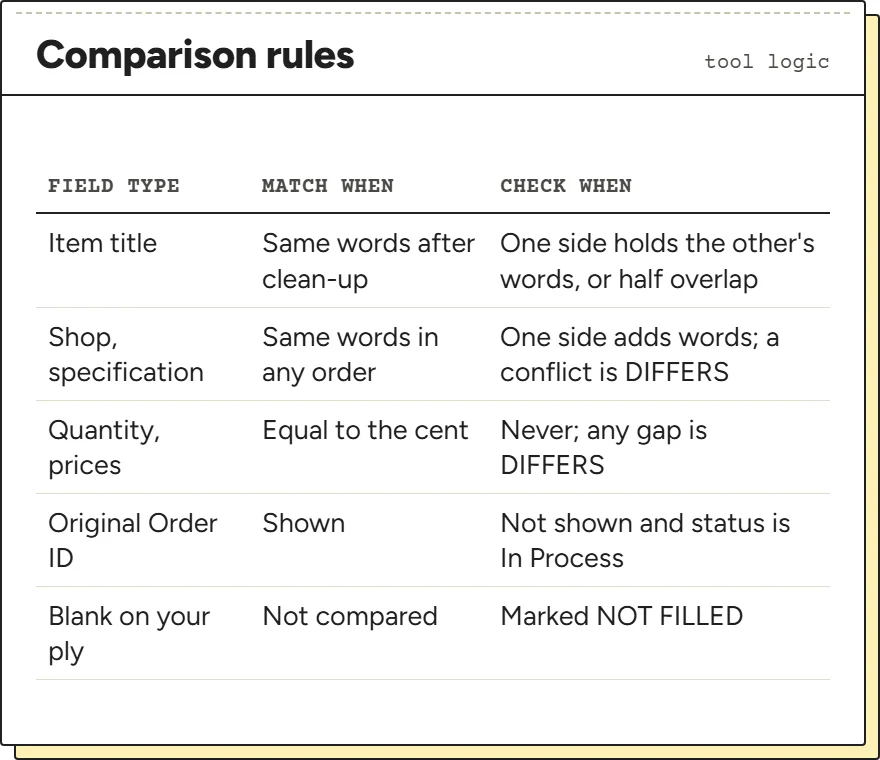
Text fields are lower-cased and stripped of punctuation before they are compared, so “Oatmeal/L” and “oatmeal l” count as the same. For the title, a partial overlap gets CHECK rather than DIFFERS, because a longer or machine-translated title rarely means a different item. Shop names and specifications are stricter: a short name inside a longer one, or extra detail on one side, is a CHECK, but any word that conflicts, such as L against XL, is a DIFFERS.
Numbers are compared to the cent. A higher unit price on the order page gets a note quoting iTaoBuy's supplementary payment rule; a lower one gets a note that the help pages do not say how a lower price is settled.
The Original Order ID line works from the status you choose. Shown counts as a match. Not shown while the status is In Process is a CHECK, because the seller order may not exist yet. Not shown at any later status is a DIFFERS.
Where each stamp leads
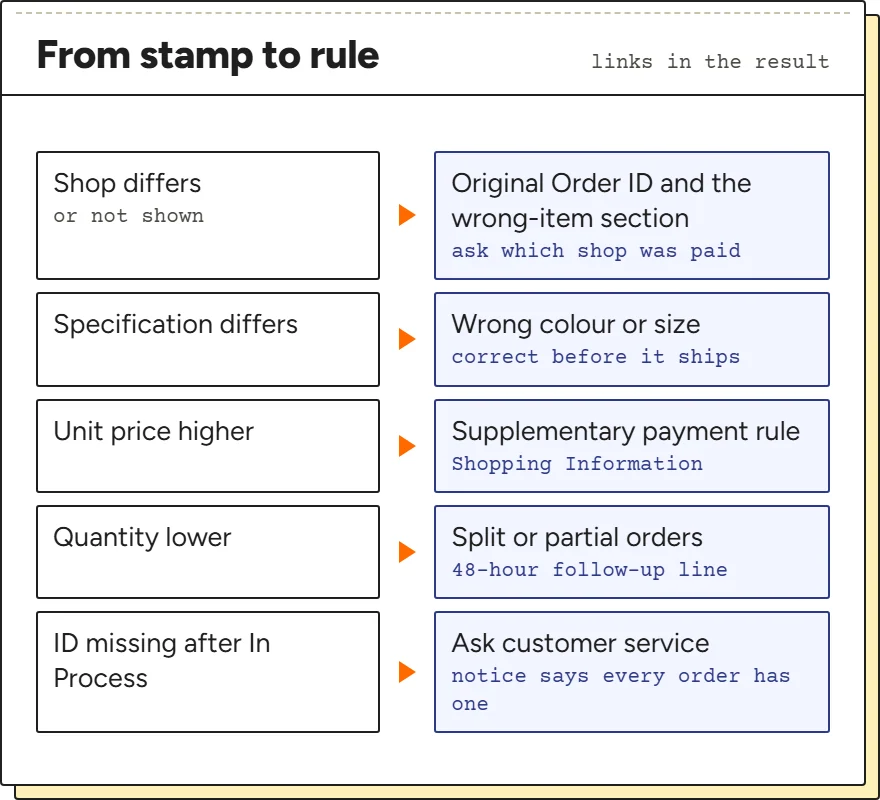
A stamp on its own is not advice. Each DIFFERS and CHECK in the result carries a What to do link to the part of this site that quotes the iTaoBuy rule behind it. A different shop name goes to the Original Order ID page, a changed specification to the section on wrong items, a higher price to the supplementary payment rule.
Some lines come from the status you picked rather than from a comparison. Additional Payment Required, Split Delivery, Cancelled and Refund Under Review each add a note with the time iTaoBuy's service table gives for that case. The tool does not chain these into a forecast; it only reports the one line that applies.
If the result is all MATCH, the message asks one thing: that customer service confirm the Original Order ID belongs to the shop you picked.
What a side-by-side check cannot tell you
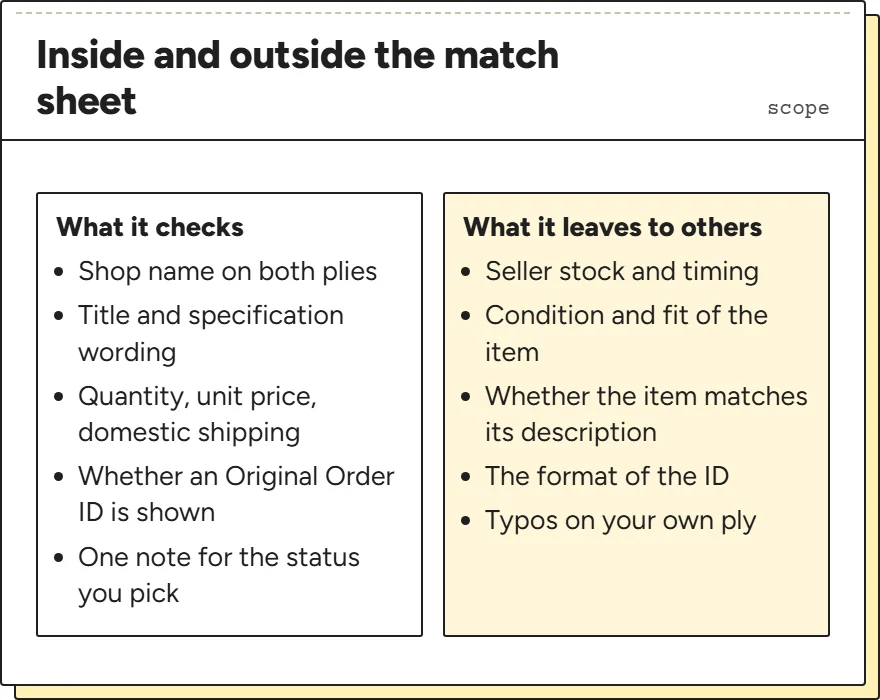
The match sheet compares two sets of words and numbers. It cannot see the seller's stock, the condition of the item or whether the item matches the listing's description; the warehouse photos are where those questions are answered, and the photo page covers that step.
It also cannot check the Original Order ID itself. iTaoBuy has not published a format, and the two example screens in its own notice show the same digits on two different orders, so there is no pattern to test against. Treat the ID as a reference to quote, not a code to validate.
Finally, it reads exactly what you type. A typo on the white ply produces a DIFFERS that is not real, so glance at your own entries before you send the message.